The first screen
The summary opens with the figures you compare rides on: average, maximum and normalized power, intensity factor, TSS, calories, and your average cadence and heart rate. Three of them turn raw watts into training load, so here is what they mean:
- Normalized power (NP) — what the ride cost, in watts. Surges are weighted up, so an hour of intervals that averages 180 W can come out at 240 W of NP, which is closer to what it took out of you.
- Intensity factor (IF) — NP divided by your FTP. An hour at your FTP is 1.0; an easy spin sits near 0.6.
- TSS — one number for how much a ride took out of you, combining intensity and duration. An hour at FTP is 100 by definition.
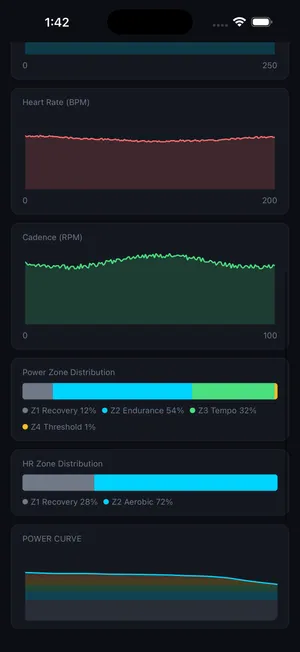
Traces and zones
Below the numbers are the full power, heart-rate and cadence traces for the whole ride, so you can see exactly where an interval fell apart or where your heart rate finally caught up with your legs. Alongside them, the zone distribution shows how long you spent in each power and heart-rate zone, the quickest way to find out whether an easy ride stayed easy.
Your power curve
The power curve plots your best effort at every duration from one second to two hours. It is the record of what you can do: your five-second sprint, your five-minute VO2max power, your hour. Track it across 30 days, 90 days, 6 months or a year and you can watch one energy system get stronger while another holds steady. Your FTP is one point on it.
All on the device
Every figure here is computed on your iPhone or iPad from the ride you just did. It is ready when you stop. There is no upload, and nothing of yours sits on a server.